
Power BI Interview Questions
How to Solve “Many to Many” relationship between facts?
Managing “Many to Many” relationships between facts in Power BI requires careful modeling and the use of shared dimensions. You must first identify the relevant dimensions and then create “One to Many” joins. You can follow these steps to accomplish this.
Identify Common Dimensions:
- Begin with identifying those dimensions which are common to your fact tables, as these common dimensions will work as bridging facts.
- In Power Query, you can merge the columns from the different tables and get distinct rows by removing duplicates to create these common dimensions.
- In DAX, you could use the functions DISTINCT or SUMMARIZE with the UNION function to achieve in a similar manner. For instance:
Distinct(Union(Distinct(Fact1[Item]), Distinct(Fact2[Item]) ))
Distinct(Union(
   Summarize(Fact1, Fact1[Item], Fact1[Item Name])
  , Summarize(Fact2, Fact2[Item], Fact2[Item Name])
))

or
DimCat = DISTINCT(UNION(DISTINCT(Fact1[Category]),
          DISTINCT(Fact2[Category]))
        )
Establish Relationships:
Establish relationships between your fact tables and the shared dimensions, either directly or through a bridge table. These relationships are typically “one to many.”
In certain situations, you may need to use bi-directional relationships. This is particularly helpful when you want to filter both fact tables based on selections made in either of the tables.
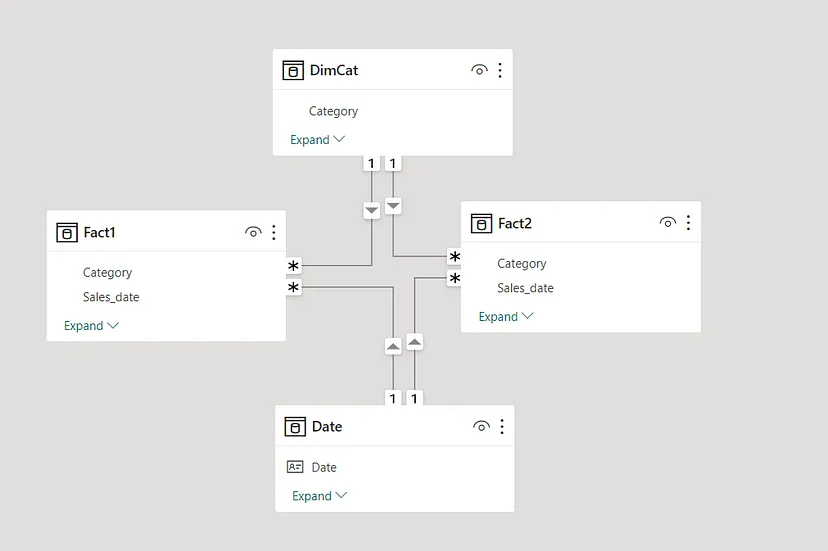
Create Measures:
Create DAX measures to calculate the measure using data from both fact tables, with the help of the relationships established via common dimensions.
This has to be done, keeping in mind the following: Complete testing and validation of reports and measures to test correctness—starting with the handling of “Many to Many” relationships—because in this scenario, many tests will fail.
Do not forget how important clear modeling and understanding of your data is. You might or might not need a bridge table—just go by what your data model wants. Proper handling of “Many to Many” relationships paves the way for granular and trustworthy reporting in Power BI.
Add comment