
Power BI Interview Questions
Data Types in Power BI
Data Type is a classification of data which tells compiler or interpreter what type of data is being used.
Data types in Power BI are used to classify values in a particular column which helps us to structure our data set.
Power BI or Power Query shows the data type on the left side of the field name/column name of the table. As shown in the Image below.

Let’s Learn About the Different Data Types in Power BI.
| Data type | Description |
| Any | Indicates no explicit data type definition. |
| Binary | A binary value, such as Y/N or 0/1. |
| Fixed decimal number | Has a fixed format of four digits to the right and 19 digits to the left. Also known as the Currency type. |
| Date | A date with no time and having a zero for the fractional value. |
| Date/Time | A date and time value stored as a Decimal Number type. |
| Date/Time/Time Zone | A UTC Date/Time with a time-zone offset. |
| Duration | A length of time converted into a Decimal Number. |
| True/False | A Boolean value of either True or False. |
| Decimal number | A 64-bit (eight-byte) floating point number. |
| Percentage | A fixed decimal number with a mask to format as a percentage. |
| Text | Strings, numbers, or dates represented in a text format. |
| Time | A time with no date having no digits to the left of the decimal place. |
| Whole Number | A 64-bit (eight-byte) integer value. |
The above table reference has been taken from Microsoft. Click here
Detection of Data Type in Power BI
Power query detects automatically detects the data type in a data set by inspecting the values.
If in any case Power Query fails to detect a data type or detects a wrong data type, then we can manually change or select it.
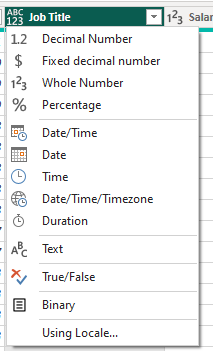
You can just click on the Icon appearing on the left side of the field name where a list will get open, from there you can select the data type. As shows in the image below.
Add comment