
Power BI Interview Questions
What Do Power BI Dataflows Do? Key Features Explained
Table of Contents
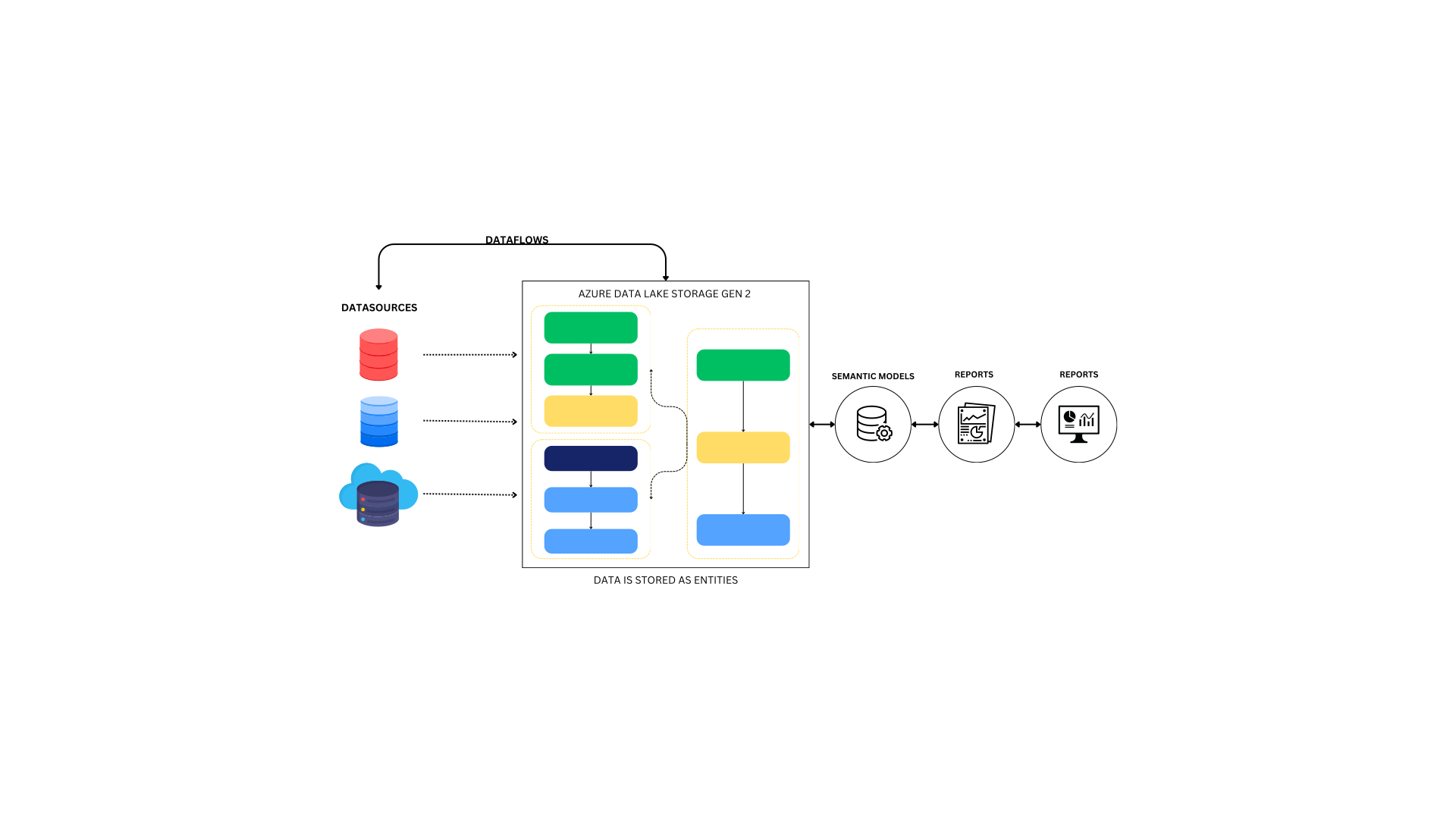
What is Power BI Dataflow?
Power BI Dataflow is a cloud-based tool within the Power BI platform that enables users to prepare, transform, and load data from various sources into Power BI for reporting and analysis. By leveraging Power BI Dataflow, you can centralize data transformation tasks and reuse them across multiple reports and dashboards. This ensures your data is clean, consistent, and ready for analysis.
Key Features and Benefits of Power BI Dataflow:
- Improved Data Governance: It ensures consistency and control over data transformation processes. It provides a clear audit trail and governance over who can access, modify, and share data, helping organizations maintain better data security and compliance.
- Centralized Data Transformation: It allows you to manage all your data transformation tasks in one central location. Whether you’re connecting to databases, cloud services, or Excel files, Power BI Dataflow provides a unified process to prepare and transform data before it’s used in reports.
- Easy-to-Use Power Query Interface: At the heart of Power BI Dataflow is the Power Query tool, which offers an intuitive interface for transforming data. Users can perform various transformations such as filtering, cleaning, merging, and shaping data without needing to write complex code.
- Integration with Multiple Data Sources: It can connect to a wide range of data sources, including cloud-based services like Azure, Salesforce, and Google Analytics, as well as on-premises databases like SQL Server and Excel. This flexibility makes it easy to combine data from different systems into a single dataset for analysis.
- Incremental Refresh: A standout feature is its support for incremental refresh. Rather than refreshing all the data, Power BI Dataflow only updates the new or modified data, making the refresh process faster and more efficient, particularly for large datasets.
- Reusability Across Reports: Once you’ve defined a dataflow, you can reuse it across multiple reports and dashboards. This reduces redundancy and ensures consistency across all your reports, as the same transformed data is used throughout your Power BI environment.
- Collaboration and Sharing: It makes collaboration easy by allowing users to store their dataflows in Power BI Workspaces. This enables teams to collaborate on data transformation tasks and share the processed data with others in a secure, organized manner.
- Cloud-Based Scalability: Being cloud-based, Power BI Dataflow scales seamlessly to accommodate increasing volumes of data. Whether you’re working with small datasets or large enterprise-level data, Power BI Dataflow provides the flexibility to handle both.
- Data Model Centralization: Power BI Dataflow can centralize your data models, making it easier to maintain and update them. Since dataflows can be accessed by multiple reports, it ensures all users are working with the same version of the data, reducing discrepancies and improving data governance.
- Enhanced Performance and Efficiency: With Power BI Dataflow, data transformation is moved to the cloud, reducing the load on local systems. By automating ETL processes, it speeds up the overall data preparation cycle, leading to more efficient report generation and faster insights.
Add comment