
Power BI Interview Questions
Master Entity Relationships in Power BI and it’s 3 types
Relationships in Power BI is a powerful business intelligence tool that allows users to create dynamic reports and dashboards from various data sources. An essential aspect of creating effective data models is understanding and using the several types of relationships in power bi that can be set up between tables. Properly defined relationships are crucial for accurate data analysis and reporting. This article explores the types of relationships in Power BI, their features, and their use cases.
Types of Relationships in Power BI
1. One-to-One (1:1) Relationship
In a one-to-one relationship, each record in one table is related to one and only one record in another table.
Use one-to-one relationships when certain attributes of an entity can be separated into a distinct table to avoid data redundancy.
In the image, there is a returns table that has details of returned products. Each table, including the returns table, has an Order ID, which serves as the primary key in both tables. This setup enables a direct relationship between the tables, ensuring that the data related to product returns is accurately linked to the corresponding orders. The use of Order ID as the primary key in both tables helps efficient data management and retrieval, allowing for comprehensive analysis of order and return transactions.

Features
- Each row in the primary table has a unique counterpart in the related table.
- Often used when splitting a table to avoid data redundancy or when handling data security and privacy issues.
2. One-to-Many (1: M) Relationship
The one-to-many relationship is the most common type in data modeling. It occurs when a single row in one table is related to multiple rows in another table.
In this image, we have an E-commerce Table, a Date Table and a Product Table. The Product table has Product details with Product ID as the primary key. The E-commerce table includes Product ID as a foreign key, linking sales data to specific Products. This setup sets up a one-to-many relationship between the tables, where each Product can have multiple sales entries. This connection allows for efficient data analysis and reporting, providing insights into Product-related sales activities.
And then we have Date Table which has Date and E-commerce Table which has Order Date. In this Each date can have multiple order dates but one order date will link to one date from date table

Features:
- A primary key in the “one” table is related to a foreign key in the “many” tables.
- Commonly used to link dimension tables to fact tables.
3. Many-to-Many (M: M) Relationship
In a many-to-many relationship, many records in one table can be related to many records in another table.
Use many-to-many relationships when entities on both sides can have multiple related records to each other.
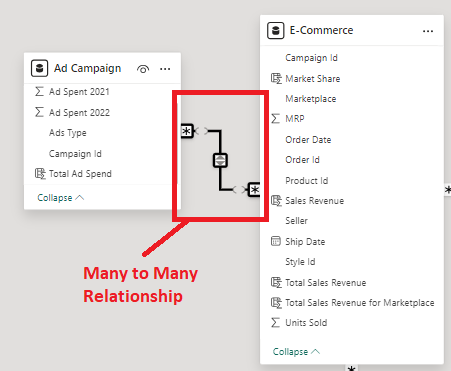
In this image, we have an Ad campaign table that has the Campaign ID for each Order, with duplicate values in the Campaign Id column. Similarly, the E-commerce table also has duplicate values in the Campaign Id column. This setup shows that multiple Ad Campaigns entries and Order records can exist. Managing these duplicates is crucial for accurate data analysis and reporting, ensuring that the Ad Campaign and Order information are properly correlated and used in the data model.
In this case, creating a relationship between the Ad Campaign and E-commerce tables, both with duplicate region values, will result in a many-to-many relationship.
Features:
- Requires an intermediary table (also known as a bridge table) to manage the relationship.
- The bridge table has foreign keys that link the related tables.
Conclusion
By defining correct relationships in Power BI, we can ensure accurate data analysis, efficiency in Database Management and reporting. Data Modeling helps us in data redundancy and helps to create accurate reports which leads to meaningful insights.
Add comment