
Power BI Interview Questions
Data Sorting in Power BI
Sorting in Power BI simply means arranging data systematically.
There are 2 ways of Sorting in Power BI:
- Ascending: – Text is arranged A-Z, Number as smallest to Largest and Date as oldest to newest.
- Descending: – Text is arranged Z-A, Number as Largest to Smallest and Date as Newest to Oldest.
2 types of sorting in Power BI are:
- Based on Single Column
- Based on Multiple Column
Let’s Understand them more:
We will be choosing the below dataset.
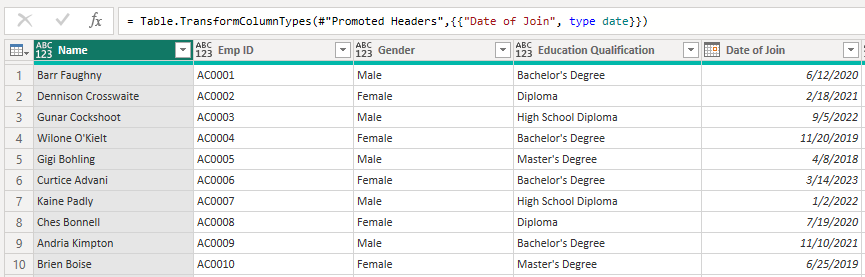
Based on Single Column
Let’s Sort Employee Names by Gender.
You just have to click on the Arrow on the right side of the column name, a list will appear where you have to choose whether you have to arrange them in ascending or descending.
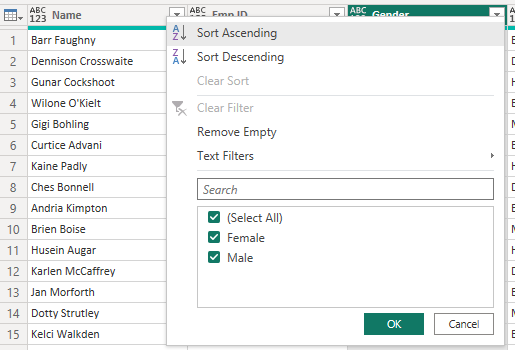
Let’s Choose Sort Ascending, In the output Females should come first then male. Let’s see what is in the output.
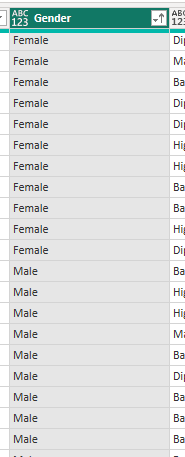
As you can see the values are sorted in a manner where female entries come before male now.
Based on Multiple Column
We can sort data based on multiple columns also. Assume, we want to Females sorted by each qualification who have joined recently.
So firstly, we have to sort data by gender, then by Education Qualification then by their Date of join.
The steps will be the same as in sorting based on one column, but we have to repeat that 3 times for 3 different levels in sorting.
So out output will be:

As you can see in the above image, In the right side of column names Gender, Education Qualification and Date of join we can see 1,2 and 3 digits are appearing which shows the sequence of sorting.
By the Above Image we can know the names of female by their qualification who have joined recently.
Click Here to check out more articles
Add comment